



I have been using an LXC container to run my Docker containers for some time now, on the original thought of an LXC container being less resource-intensive than a VM. However, I was going back on that idea after reading some articles and reddit posts (like this one, this one or this one). The main drawback of running Docker containers inside an LXC container is that the LXC container is much less secure / isolated from the host system than a full-fledged VM. That was the biggest reason to do this for me: the stronger layer of isolation and security of a VM compared to an LXC container.
I still wanted the VM to not give too much overhead though. Luckily the world of Linux always has you covered, this time with Alpine Linux. It's a very lightweight and small distro, perfect for what I want it to do. I created a VM with just a little better specs than the container had:
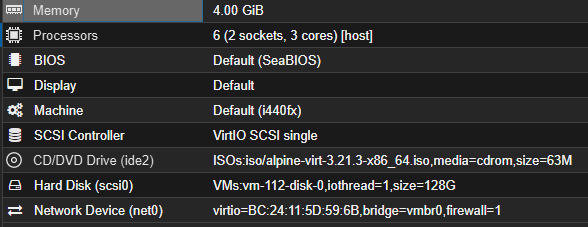
This should be plenty to run some containers. I went on to installing the OS, which was very straightforward thanks to the setup-alpine command. I went with sys mode for the storage and left the rest at default.
After that, it was just a matter of installing docker and docker compose: (from the wiki)
      apk add docker docker-compose
      rc-update add docker default
      service docker start
      addgroup ${USER} docker
Make sure you logout and log back in for the permissions to have been set correctly.
Now, the last things to do:
And done! ψ(`∇´)ψ
hi lil nugget :)